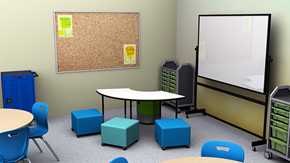
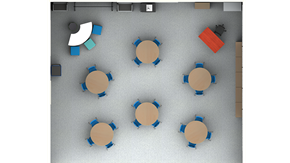
Elementary Interactive Lecture Classroom with Round Tables

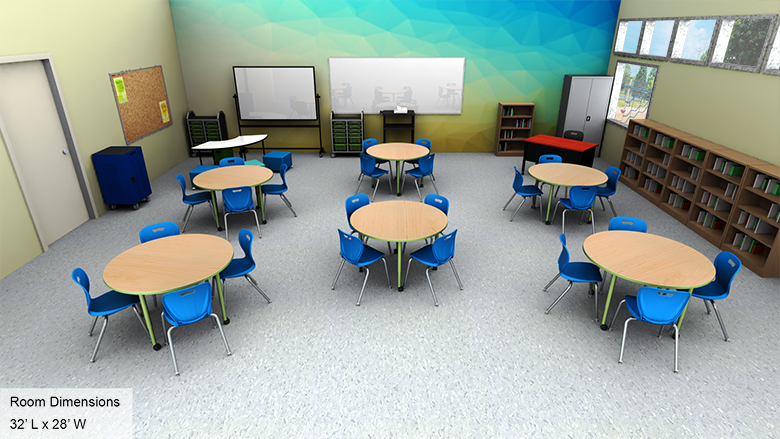
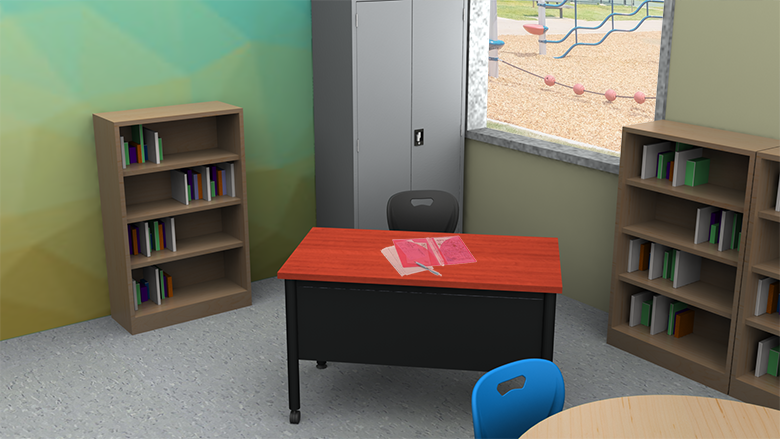
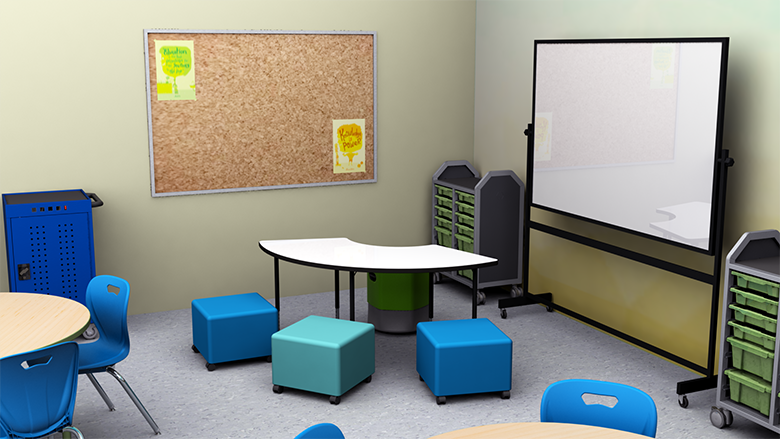
Elementary Interactive Lecture Classroom - Overall View Elementary Interactive Lecture Classroom - Alt View 1 Elementary Interactive Lecture Classroom - Alt View 2 Elementary Interactive Lecture Classroom - Plan View
Loading...

Elementary School Interactive Lecture Classroom Design & Technology Solutions

The interactive lecture classroom aims to keep students engaged with their lesson material. By combining the traditional lecture with breakout periods, students have the opportunity to engage with the lesson material directly through collaborative discussions, brainstorming sessions or independent assignments. Desks should be arranged in such a way that they can be easily moved or turned to form small groups. A spacious worksurface like a wide desktop or activity table assists teachers with class-wide demonstrations or presentations. Storage units keep student devices or project materials secure and organized.

Requirements for a Great Interactive Lecture Classroom

For Students

The interactive lecture classroom should provide personalized space for each student and storage space for their books and devices. The desks should be arranged so that all students can easily view the teacher as he or she presents lesson material. Workstations should be easy to move into small group formations for projects or brainstorming. Seating should be both durable and comfortable enough to support long periods of sitting.

For Teachers

The interactive lecture classroom should facilitate class-wide presentations with large writing surfaces and tools such as a projector and interactive whiteboard. Walkways between desks should allow for the teacher to move around the classroom as they lecture or observe students in independent work. Desks should be arranged in a way that they can be quickly turned around or pushed together for small group work.

For Administrators

The interactive lecture classroom should be arranged and furnished in a way that aligns with the vision for that space. They need to know that all products are available at the time they are needed and that their order will arrive correctly and on time. Installations must be quick and efficient.

Interactive Lecture Classroom Layout Areas

Lecture Area

Designed to accommodate both independent and collaborative work:

  • Student workspaces: Give students an area for independent assignments or note-taking as well as group projects or collaboration.
  • Flexible school chairs: Constructed from durable, reinforced plastic that supports students as they lean back. The smooth, anti-static seats don't require a metal backrest, which means students won't snag hair or clothing on exposed rivets. The lightweight design makes it easy for students to pick them up and move them around the room.
  • Projector cart: Stores the classroom projector and additional shelving holds AV accessories or lesson materials. Rolling casters make it easy to move out of the way when not in use.
  • Digital projector: Displays lesson materials, notes or supplemental information to students. Digital projectors can be placed a short distance away from the screen, keeping walkways open for teachers and students to move around the room as needed.
  • Projector screen: Large screen ensures all students can easily see the lesson material. A matte screen surface reduces glare.

Teacher Area

Gives educators everything they need for great teacher-led discussion or demonstration:

  • Teacher desk: Gives educators their own personal work surface. Storage pedestals beneath the tabletop keep supplies and personal belongings organized.
  • Teacher chair: Ensures educators remain comfortable as they mentor students or grade assignments.
  • Mobile markerboard: Allows teachers to write down notes or assignments as the lecture or present. Rolling casters make it simple to move anywhere in the room.
  • Mentoring table: Gives teachers a dedicated place to meet with students one-on-one or in small groups for mentoring or extra help.
  • Soft seating: Placed around the mentoring table keeps teachers and students comfortable as they work through lessons or hold discussions.

Storage Equipment Area

Keeps the classroom organized, so students and teachers can quickly access supplies and materials without consuming much class time:

  • Mobile bin storage cart: Can be rolled directly to students, making distributing and collecting supplies easy. Clear bins make it simple to locate needed materials, and they can be completely removed from the unit for use at workstations. Large and small bin sizes accommodate a variety of storage needs.
  • Locking storage cabinet: Secures devices or other materials that may require teacher supervision. Locking items away also reduces distractions by keeping tools, supplies and projects out of view. Teachers may also opt to use this cabinet for securing personal belongings.
  • Charging cart: High-capacity device charging keeps all your classroom devices charged and ready for use. Locking doors keep them secure overnight. Heavy-duty rolling casters easily maneuver over any flooring, and the top doubles as an additional surface for storage or presentation.
  • Bookcases: Provide students with a consistent place to find their reading or research materials.

Choosing Your Interactive Lecture Classroom Solution

School Outfitters makes it simple to outfit an interactive lecture classroom. Choose the option that best fits your budget and needs, and with just one click, you get an itemized quote for this classroom, including all three specially-designed stations. Our helpful representatives are happy to answer questions about our stations and how you can put them to use in your collaborative learning classroom.

Call us at 1-800-260-2776 for personalized assistance.

Interactive Lecture Classroom Frequently Asked Questions

What makes an interactive lecture classroom effective for elementary students?

An interactive lecture classroom combines traditional lectures with breakout periods, allowing students to engage directly through collaborative discussions, brainstorming sessions, and independent assignments. Desks should be easily moved or turned to form small groups, while spacious work surfaces assist teachers with class-wide demonstrations and presentations.

How should student workspaces be designed for elementary interactive learning?

Student workspaces should provide personalized space for each student with storage for books and devices. Desks should be arranged so all students can easily view the teacher during presentations and be easy to move into small group formations for projects or brainstorming. Seating should be durable and comfortable for long periods.

What technology features are important for elementary interactive lecture classrooms?

Essential technology includes projector carts for mobile AV setup, digital projectors for displaying lesson materials, projector screens with matte surfaces to reduce glare, and charging carts to keep devices ready for use. This technology should be easily accessible while maintaining open walkways for movement.

Why is a mentoring table important in elementary interactive classrooms?

A mentoring table gives teachers a dedicated place to meet with students one-on-one or in small groups for individualized instruction and extra help. Combined with soft seating, it creates a comfortable environment for personalized learning and building teacher-student relationships.

We're here to help. Contact us.
Call
Ready to speak with
a project expert?
Call 1-800-260-2776.
We're ready to listen!
Chat
No time for a
phone call?
Chat with a (real)
project specialist.
Read More
Want to learn more
about this space?
Check out our helpful
room guide.
loading...
Sign up to receive offers & updates
Accepted payment types
Shop with confidence
Better Business Bureau®
Loading...