Blended Learning Makerspace

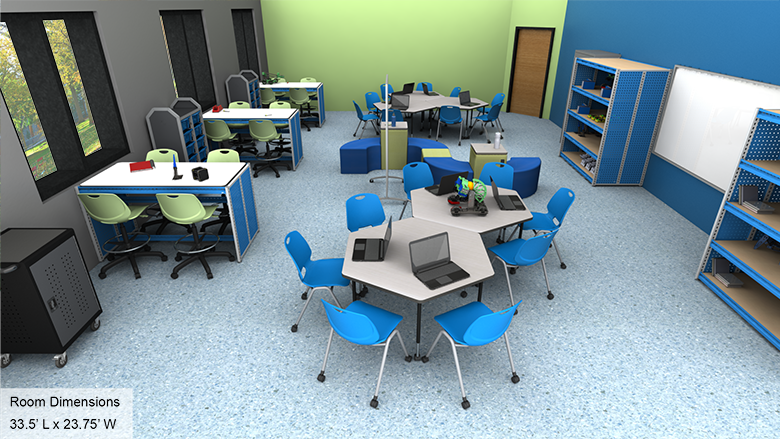
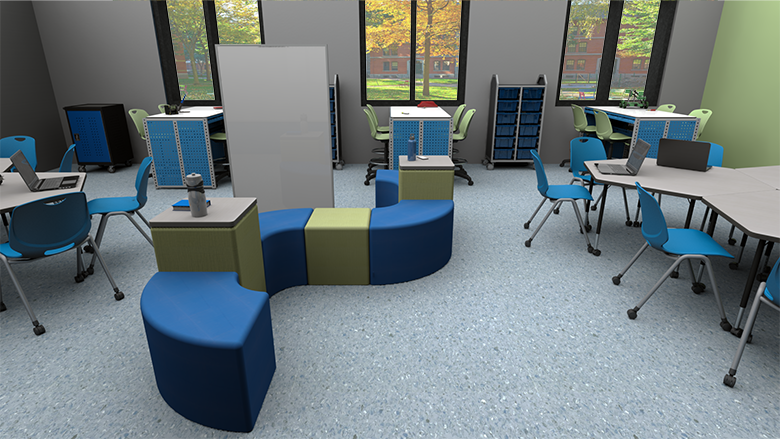
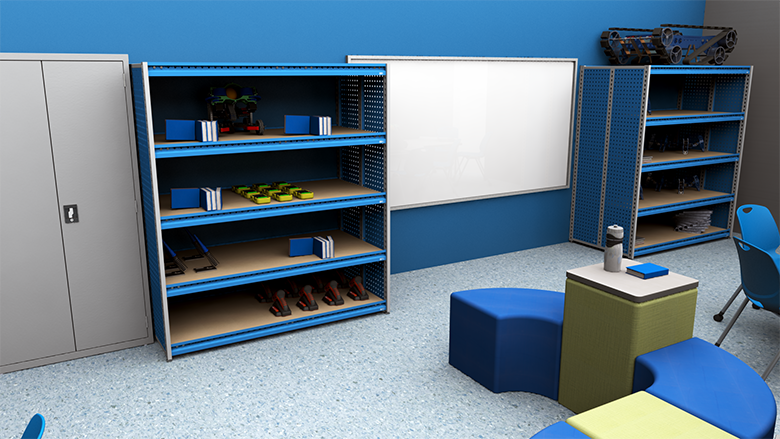
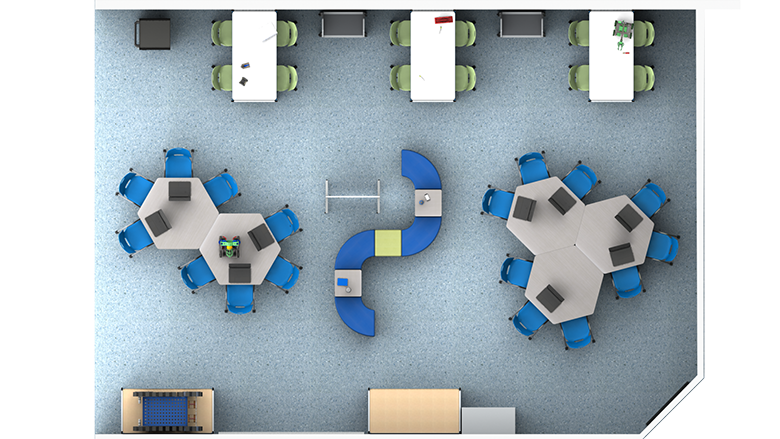
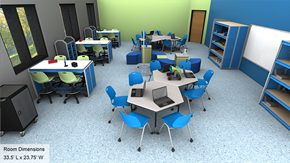
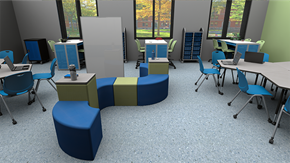
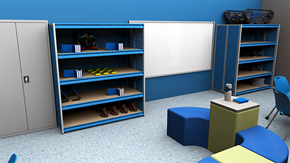
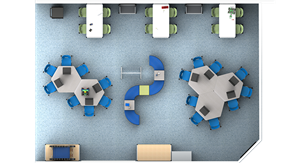
Blended Learning Makerspace - Overall View Blended Learning Makerspace - Alt View 1 Blended Learning Makerspace - Alt View 2 Blended Learning Makerspace - Plan View
Loading...

Middle & High School Blended Learning Makerspace Design Solutions

The blended-learning makerspace combines technology with maker activities and face-to-face collaboration. Computers or devices should be easily accessible to students researching projects and for teachers to assess performance or chart progress. Technology tables provide students with enough space to use computers while spreading out books or project materials. A collaborative work area allows students to participate in project planning sessions or group work.

Requirements for a Great Blended Learning Makerspace

For Students

A great blended learning makerspace should include easy access to computers, laptops, or tablets with enough space to spread out books or other materials. Work surfaces should include grommet holes or wire management systems to keep cables out of the way. A readily accessible collaborative space should be available for maker activities or project planning. Students should be able to move around the room with ease.

For Teachers

The makerspace should feature a dedicated space for technology use and collaborative tables to accommodate maker projects, group discussions, or planning sessions. A charging cart makes it simple to keep student devices ready for use, since they can be locked away and charged overnight. Mobile or lightweight seating is ideal since it can be easily moved between technology and collaborative areas.

For Administrators

A blended learning makerspace should be comprised of furnishings selected with the needs of their school in mind, and all products must be available at the time they are needed. The delivery must arrive on time and installation should be quick and efficient.

Blended Learning Makerspace Layout Areas

Demonstration Area

Gives teachers a place to present lesson material or instructions to the whole class:

  • Collaborative tables: Feature spacious work surfaces that are still compact enough to allow team members to reach materials for their activities. Table shapes designed to let all students see each other, giving everyone equal opportunity to participate. Thick tabletops withstand heavy use with laminate surfaces that clean easily.
  • Mobile school chairs: Constructed from durable, reinforced plastic supporting students as they lean back. Smooth, anti-static seats don't require metal backrests, preventing snagging of hair or clothing. Rolling casters make it easy for students to move them around the room.
  • Mobile whiteboards: Provide large writing surfaces for communicating assignments or presentations. Magnetic surface lets students and teachers display papers or storyboards while sharing ideas. Rolling casters easily maneuver over floor surfaces.
  • Lockable cabinet: Secures devices or materials requiring teacher supervision. Locking items away reduces distractions by keeping tools, supplies, and projects out of view.

Project Area

Designed to assist teachers and students in creating space that accommodates group work and projects:

  • Adjustable-height tables: Feature adjustable legs making it easy to accommodate students of various sizes. Spacious tabletops let students spread out materials with thick laminate that cleans easily. Lightweight, sturdy construction makes moving tables into groups simple.
  • Adjustable-height stools: Give students freedom of movement as they focus on activities. Backless seats promote good posture and strengthen core muscles. Adjustable legs ensure students of all sizes are comfortable.
  • Mobile whiteboard easels: Can be rolled to workstations for student brainstorming and idea capture on the fly. Two writing surfaces let students write ideas or present information. Can also section off workspaces when needed.
  • Mobile storage carts: Roll directly to student workstations for easy supply distribution and collection. Clear bins make it simple to locate materials and can be removed for workstation use. Large and small bin sizes accommodate various storage needs.
  • Mobile charging carts: Keep all classroom devices charged and ready for use. Locking doors keep them secure overnight. Heavy-duty rolling casters maneuver easily over any flooring with tops doubling as additional storage or presentation surfaces.
  • Open shelving: Provides spacious, dedicated area for storing in-progress projects or displaying completed projects.

Breakout Area

Gives individual students or small groups a place to work through specific ideas in a quiet area:

  • Soft seating: Lightweight and easy to move so students can quickly arrange themselves into groups as needed. Soft padding keeps users comfortable.
  • Power-enabled furnishings: Give students a place to charge their devices during collaborative work.
  • Dry-erase room dividers: Can be used to section off breakout groups, ensuring students aren't disturbed during discussion. Double-sided, magnetic painted steel surface doubles as additional dry erase writing surface or place to hang assignments or artwork.

Choosing Your Blended Learning Makerspace Solution

School Outfitters makes it simple to outfit your school's blended learning makerspace. Choose the option that best fits your budget and needs and get an itemized quote with just one click, including all three specially-designed solutions. Our helpful sales representatives are happy to answer questions about our solutions and how you can put them to use in your school.

Call us at 1-800-260-2776 for personalized assistance.

Blended Learning Makerspace Frequently Asked Questions

What makes a blended learning makerspace effective for middle and high school students?

An effective blended learning makerspace combines technology with maker activities and face-to-face collaboration. It should include easily accessible computers or devices, technology tables with enough space for computers and project materials, collaborative work areas for project planning, and proper wire management systems to keep cables organized.

How should furniture be arranged in a blended learning makerspace?

Use mobile or lightweight seating that can easily move between technology and collaborative areas. Collaborative tables should be compact enough for team members to reach materials while providing spacious work surfaces. Include demonstration areas for whole-class instruction and breakout areas for small group work.

What storage solutions work best for makerspaces?

Mobile storage carts can be rolled directly to workstations for easy supply distribution. Lockable cabinets secure devices requiring supervision while reducing distractions. Mobile charging carts keep devices ready with secure overnight storage. Open shelving displays projects and stores in-progress work.

Why are adjustable-height tables important in makerspaces?

Adjustable-height tables accommodate students of various sizes and different project requirements. They can be reconfigured for standing or sitting work, collaborative projects, and different maker activities. The flexibility supports diverse learning styles and project needs.

We're here to help. Contact us.
Call
Ready to speak with
a project expert?
Call 1-800-260-2776.
We're ready to listen!
Chat
No time for a
phone call?
Chat with a (real)
project specialist.
Read More
Want to learn more
about this space?
Check out our helpful
room guide.
loading...
Sign up to receive offers & updates
Accepted payment types
Shop with confidence
Better Business Bureau®
Loading...